How to submit your 10DLC business registration in Phone Sniper (with examples that get approved)
A step-by-step guide to the business registration carriers require before your numbers can text, with a filled-in example of every field, sample texts that pass review, and the mistakes that get campaigns rejected.
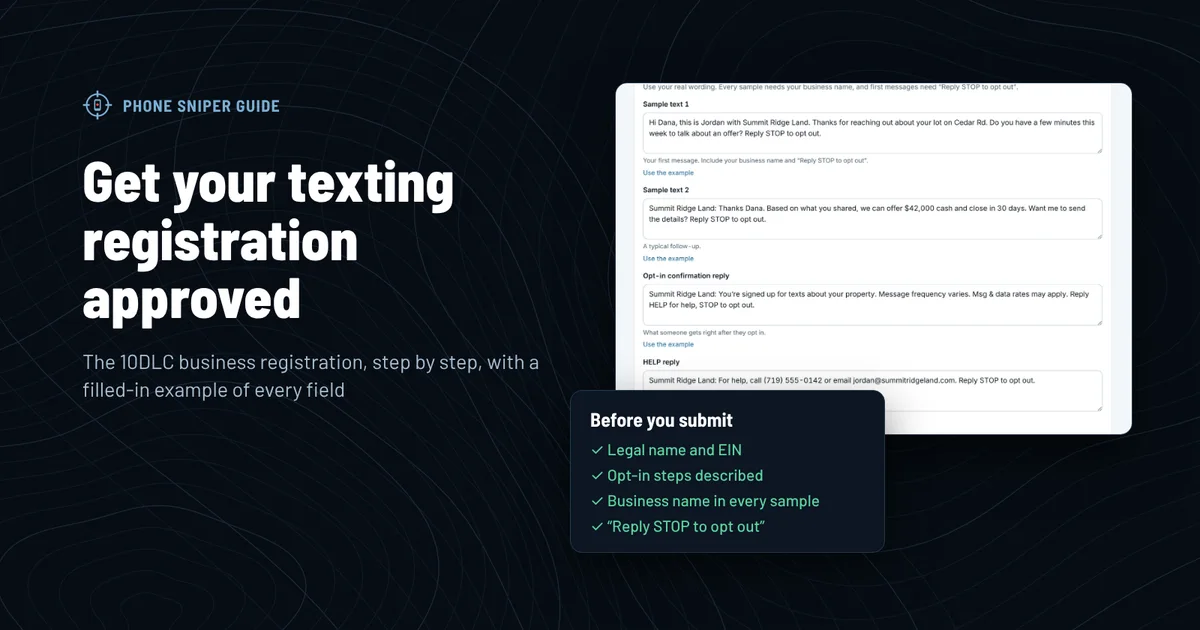
Before your Phone Sniper numbers can text anyone, the phone carriers need to know who's sending. That's 10DLC registration. It applies to every business that texts from a regular 10-digit number, and texts from unregistered businesses are blocked. You fill out one form in your dashboard, we file it with the carriers for you and pay the carrier fees for your first filing, and your numbers start sending as soon as it's approved.
The form takes about 10 minutes. Getting it approved the first time takes a little more care, because carriers reject anything vague, inconsistent or missing. This guide walks through every field with a filled-in example, then covers what reviewers actually check.
What you'll need before you start
- Your IRS EIN letter (CP 575 or 147C). The legal name, EIN and address on it are what carriers check against.
- Your website, or a Google Business Profile or LinkedIn page if you don't have one. It needs to show the same business name.
- The page where people agree to your texts, like a contact form with a texting checkbox.
- Links to your privacy policy and texting terms. Both need to be live. What they need to say is further down.
- Two texts you'll really send.
Step by step: the registration form
Click a step to jump to it, and click the red numbers on each screenshot for tips. Click any screenshot to see it full size. The example business is Summit Ridge Land Co LLC, a made-up land buyer in Colorado.
How to get your campaign approved the first time
Carriers send every registration to human reviewers working from a checklist. Most rejections come down to a handful of fixable things.
1. Match the IRS exactly
The legal name, EIN and address have to match IRS records character for character. "Summit Ridge Land" won't match "Summit Ridge Land Co LLC". If your business has moved since you got your EIN, use the address the IRS has on file, or update it with the IRS first.
2. Have a real, live website
Reviewers open your website. It should load, show the same business name, and say what you do. Your privacy policy and texting terms should be linked from it. A parked domain, a "coming soon" page or a site for a different business name gets rejected.
3. Show real consent, and describe it honestly
This is the part that matters most. Carriers approve business texting to people who agreed to get texts from you, and they want to see exactly where that happened. Common ways investors and agents collect consent:
- A website form with an optional phone field and an unchecked texting box, like the example in step 7.
- A text-in keyword on your mailers, signs or ads: "Text LAND to (719) 555-0142 for a cash offer." The owner texts you first, you reply with a confirmation, then you talk.
- Owners who contact you first by text or phone, and ask you to follow up by text.
- A recorded script on calls, where the owner says yes to texts. Include the exact wording in your registration.
4. Write samples that sound like you, with your name and STOP
Your samples should be texts you'll really send, and they should match your campaign description. Every sample needs your business name. First messages need "Reply STOP to opt out."
| Gets approved | Gets rejected |
|---|---|
| Hi Dana, this is Jordan with Summit Ridge Land. Thanks for reaching out about your lot on Cedar Rd. Do you have a few minutes this week to talk about an offer? Reply STOP to opt out. | Hi, want cash for your house?? We buy fast, guaranteed offer! |
| Summit Ridge Land: Thanks Dana. Based on what you shared, we can offer $42,000 cash and close in 30 days. Want me to send the details? Reply STOP to opt out. | Is this the owner of 123 Main St? Text back YES. |
The rejected ones have no business name and no opt-out. One reads like spam ("guaranteed", double question marks), and the other is a cold message to someone who never contacted you.
5. Skip the words that trip spam filters
Leave out "guaranteed," "act now," "risk-free," "winner," all caps, and link shorteners like bit.ly. Don't mention loans, credit or debt relief unless that's really your business; those are restricted categories with extra review.
6. Keep everything consistent
The reviewer reads your description, opt-in steps, samples and website side by side. If your description says owners opt in on your website, the checkbox needs to be there. If your samples talk about offers, the use case should be Mixed or Marketing, not just Customer care.
Example: the full registration for a land buyer
Here's everything Summit Ridge Land submitted. Use it as a model and change every detail to match your business. The Fill empty campaign fields with examples button on the form writes the campaign parts with your own business name.
| Field | Example |
|---|---|
| Legal business name | Summit Ridge Land Co LLC |
| Brand name (DBA) | Summit Ridge Land |
| EIN | 12-3456789 |
| Business type | Private company (LLC, corporation, partnership) |
| Address | 2150 Elm Ridge Rd, Pueblo, CO 81003 |
| Website | https://summitridgeland.com |
| What your texts are for | Mixed |
| Campaign description | Summit Ridge Land buys land and homes directly from owners. We text property owners who asked us to contact them by text through our website form, a text-in keyword on our mailers, or by texting us first, to answer questions, make offers and schedule calls. Messages are conversational and every first message says how to opt out. |
| Opt-in steps | Owners opt in on our website (https://summitridgeland.com/contact) by entering their phone number (optional field) and checking an unchecked box that says: "I agree to receive text messages from Summit Ridge Land about my property, including offers and scheduling. Message frequency varies. Msg & data rates may apply. Reply STOP to opt out, HELP for help. Consent is not a condition of any purchase." Links to our Privacy Policy and Texting Terms sit next to the box. Owners who get our mailer can also opt in by texting SELL to our number; we reply with a confirmation before anything else. |
| Opt-in confirmation | Summit Ridge Land: You're signed up for texts about your property. Message frequency varies. Msg & data rates may apply. Reply HELP for help, STOP to opt out. |
| HELP reply | Summit Ridge Land: For help, call (719) 555-0142 or email jordan@summitridgeland.com. Reply STOP to opt out. |
| STOP reply | Summit Ridge Land: You're unsubscribed and won't receive any more texts from us. |
Your privacy policy and texting terms
Both pages need to be live on your website before you submit, and linked next to your texting checkbox.
Your privacy policy needs a line saying you don't share or sell phone numbers or texting consent. For example:
We do not sell, rent or share your mobile phone number or text messaging consent with any third party for their marketing purposes. Text messaging opt-in data and consent are never shared with third parties.
Your texting terms need your program name, what you text about, how often, message and data rates, and how to get help or stop. For example:
Summit Ridge Land text messages. When you opt in, Summit Ridge Land will text you about your property, including offers and scheduling. Message frequency varies. Message and data rates may apply. Reply HELP for help or contact jordan@summitridgeland.com or (719) 555-0142. Reply STOP to opt out at any time. Carriers are not liable for delayed or undelivered messages. See our Privacy Policy at summitridgeland.com/privacy.
After you submit
- We file it for you. Your status on the Numbers page changes to "Submitted," then "In carrier review."
- Review usually takes 1–2 weeks. Your numbers start sending as soon as it's approved, and they're added to your campaign automatically.
- If carriers ask for changes, the status changes to "Needs changes" and we email you what to fix. Update the form and submit it again. Your first filing is free; refiling after a rejection costs $15, which you pay from the same page.
- While you wait, import your lists, build campaigns and send yourself free test texts.
Common questions
I'm a sole proprietor without an EIN. Can I still register? Yes. Pick "Sole proprietor" as the business type and leave the EIN empty. Sole proprietor registrations have lower daily sending limits.
I don't have a website. Use your Google Business Profile or LinkedIn page for the business. You still need somewhere to host your privacy policy and texting terms, and a way for people to opt in, such as a text-in keyword on your mailers.
What does registration cost? Your first filing is free on every plan. We pay the carrier fees. If carriers reject it, refiling costs $15. Here's how the free registration works.
Do I need to register again when I add numbers? No. New numbers are added to your approved campaign.
Can I text owners while I wait? Not from your own numbers. Carriers block texts from unregistered numbers, and sending them can hurt your approval. You can send free test texts to your own phone from the Numbers page.